• Welcome to MacanEVowners! If you're joining us from Taycanforum.com, then you may already have an account here.

    If you were registered on Taycanforum as of January 24, 2024 or earlier, then you can simply login here with the same username and password

    If you wish, you can remove your account here.
Sponsored

Ghost departure times in app

JohnDor

Macan 4S
Member
First Name
John
Joined
Jun 30, 2025
Threads
2
Messages
13
Reaction score
4
Location
Netherlands
Vehicles
Porsche Macan 4s (inbound)
Country flag
Hi all!

I own the Macan 4s a little over 2 months now; what a car!

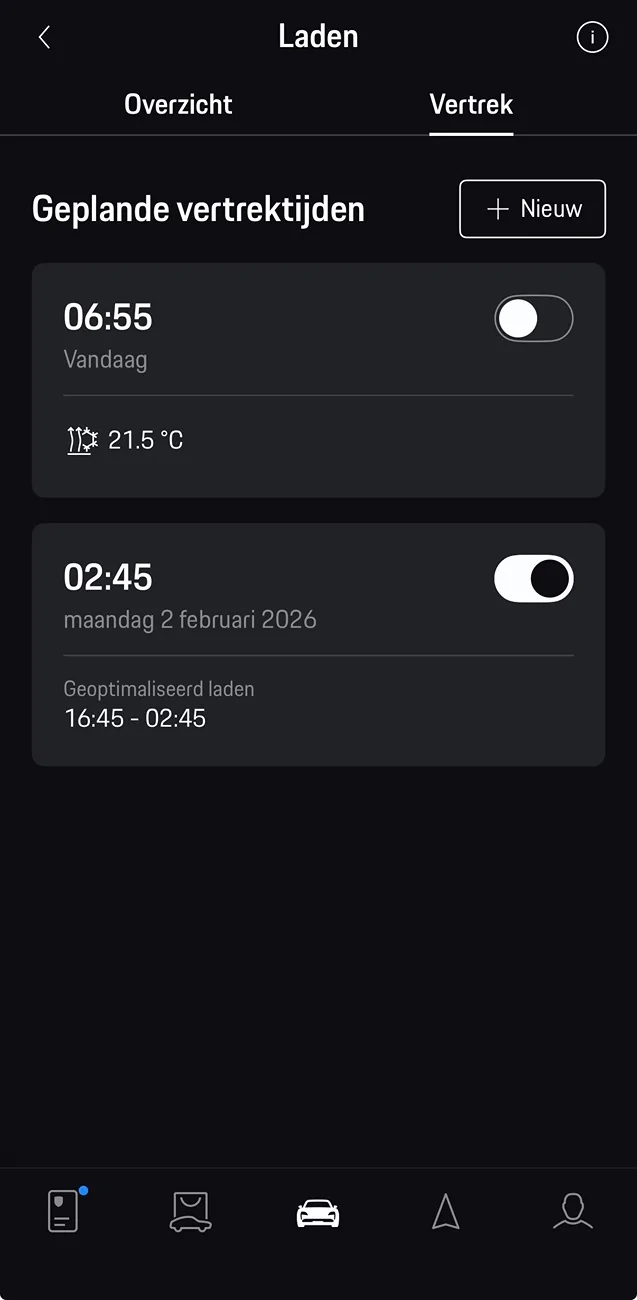
Just one annoying issue; the app is planning random departure times on its own and deactivating the ones I created… For instance in the picture the top one was the one I planned. It got deactivated and the bottom one appeared with different settings that I would use (I use preheating, this does not, this uses planned charging, I never do).

Anyone familiar with this issue? The car will hit the dealer next week…

Electric Macan EV Ghost departure times in app 2Q==
Sponsored


Andy718S

Macan 4S
Member
First Name
Andy
Joined
Feb 27, 2025
Threads
1
Messages
10
Reaction score
7
Location
UK
Vehicles
Macan EV GTS, Boxster 718S (Macan EV 4S now sold)
Country flag
Do you use an energy supplier who controls the charging timeslots for your car?

I understand that some electric suppliers who actively managed charging, use the departure time facility to control the charging process.
 
  • Like
Reactions: MMR

jonrblair

Macan 4
Member
First Name
jon
Joined
Mar 21, 2025
Threads
1
Messages
20
Reaction score
13
Location
london
Vehicles
macan 4 ev
Country flag
I have this all the time. It is pretty annoying. I dispatch the rogue/ghost departure time to the bin whenever I see it and lo and behold it reappears with a new date and time next time I go to look. It seems there is nothing one can do about it at least inmmy experience.
 

gunnar

Macan 4
Member
First Name
gunnar
Joined
Mar 21, 2025
Threads
3
Messages
10
Reaction score
1
Location
sweden
Vehicles
Porsche Macan 4 2025
Country flag
Hi all!

I own the Macan 4s a little over 2 months now; what a car!

Just one annoying issue; the app is planning random departure times on its own and deactivating the ones I created… For instance in the picture the top one was the one I planned. It got deactivated and the bottom one appeared with different settings that I would use (I use preheating, this does not, this uses planned charging, I never do).

Anyone familiar with this issue? The car will hit the dealer next week…
2Q==.webp
I have a problem with this too. I have smart control via an app from my electricity supplier. Porsche has no real integration, meaning they don't open it up for external devices to read, for example, the battery level in the car, etc. Unfortunately, this is a bit unreliable and sometimes the car is not charged to the level I have set. If I turn off the smart control it works. But if I stop charging I have to go out and unplug the charger and restart. Unfortunately Porsche is pretty bad at this. I have had an electric car since 2017 and have never had problems with other cars. You have to learn how to manipulate the system.


OP
OP

JohnDor

Macan 4S
Member
First Name
John
Joined
Jun 30, 2025
Threads
2
Messages
13
Reaction score
4
Location
Netherlands
Vehicles
Porsche Macan 4s (inbound)
Country flag
Do you use an energy supplier who controls the charging timeslots for your car?

I understand that some electric suppliers who actively managed charging, use the departure time facility to control the charging process.
I do use a supplier that optimizes charge times. But why would that trigger a new departure time days ahead?
 

MMR

Macan Turbo
Well-Known Member
Joined
Aug 19, 2025
Threads
3
Messages
173
Reaction score
154
Location
London
Vehicles
Macan Turbo
Country flag
My understanding is Porsche’s EV smart charging system is built around the departure timer, the car needs a target time to know when it must have finished charging. Without a departure time, the car will generally start charging immediately when plugged in.

Some energy suppliers (like IOG) don’t provide a direct “charge now / pause now” command for Porsche vehicles, so they create a future departure time instead. They then toggle that schedule to start or pause charging according to their smart logic. Essentially, the future departure time is a tool these suppliers use to tell the car when to charge, allowing it to optimize for off-peak electricity and readiness for your next trip.

So even if it seems odd that the departure is set far in the future, this is just how smart charging services interface with Porsche’s system — it’s necessary to give the car a “deadline” before it will follow a smart charging schedule.

Unfortunately, my MY26 Turbo becomes unresponsive whenever there’s a pause in the smart charging schedule. Porsche has basically confirmed that their interface isn’t guaranteed to work with third-party software. My workaround has been to let IOG communicate directly with my Andersen Wall Charger to handle the smart charging schedule, which keeps the car’s departure times intact and everything fully responsive.
 

Andy718S

Macan 4S
Member
First Name
Andy
Joined
Feb 27, 2025
Threads
1
Messages
10
Reaction score
7
Location
UK
Vehicles
Macan EV GTS, Boxster 718S (Macan EV 4S now sold)
Country flag
Unfortunately, my MY26 Turbo becomes unresponsive whenever there’s a pause in the smart charging schedule. Porsche has basically confirmed that their interface isn’t guaranteed to work with third-party software. My workaround has been to let IOG communicate directly with my Andersen Wall Charger to handle the smart charging schedule, which keeps the car’s departure times intact and everything fully responsive.
Originally it worked well. However, I also started experiencing issues charging my 4S from June 25 onwards until I sold the car in November.

After extensive correspondence with Octopus, they confirmed that there is a known issue with Enode (who actually provide the control service for Intellient Octopus Go) with VW group cars including the Macan EV.
Octopus have changed their comparability tool on the website so that some Macan EV models are shown as not compatible whilst others are compatible. I’ve asked them to review the tool as it makes no sense that there is any difference.
My incoming GTS is shown as not being compatible and my Podpoint charger is also not compatible, so I’ll stick with Octopus Go.

Turning to the original point of the thread, I was regularly getting departure schedules set in my 4S by Octopus. Tech support were asking me to clear these as part of the testing. MMR has explained how the system works - sadly, it appears that it is simply not reliable.
 

Wivenhoe

Macan 4S
Well-Known Member
First Name
Bob
Joined
Dec 22, 2024
Threads
19
Messages
489
Reaction score
276
Location
Wivenhoe999
Vehicles
Macan 4S
Country flag
I think that the difference in approach is the cause of the issues. I much prefer the Porsche approach which ensures the car has the required charge at the planned departure time. The suppliers approach seems to be to delay start until the low charge time commences - this means the car may not have the required charge on departure.

I have the departure set at the time the off-peak ends. With Eon the off-peak is 7 hrs (midnight until 7am) then if the required charge is more than 7 hrs x 7kw I either adjust the % on departure or accept that the charge will cost a little more before midnight.
 

Wobbler

Macan 4S
Member
First Name
Kev
Joined
Dec 1, 2024
Threads
0
Messages
12
Reaction score
11
Location
UK
Vehicles
Porsche Macan 4S EV
Country flag
This issue has been driving me nuts! But I think I have finally solved it.

The “ghost’ departure times are generated by the car. It has an option to set scheduled charging times when you are at your home location. Once it detects you are within a few hundred metres of home it (via the Location setting) it generates a new departure and scheduled charging times, which will also override your energy provider / EV charger options.

To remedy it, you need to change the settings in your car. Off the top of my head go to the car, select

Charging ->Departures -> Edit Deparure (the pen symbol) ->Additional settings. Then change the scheduling option from Auto to manual.

Hth

Kev
 
Last edited:


Top